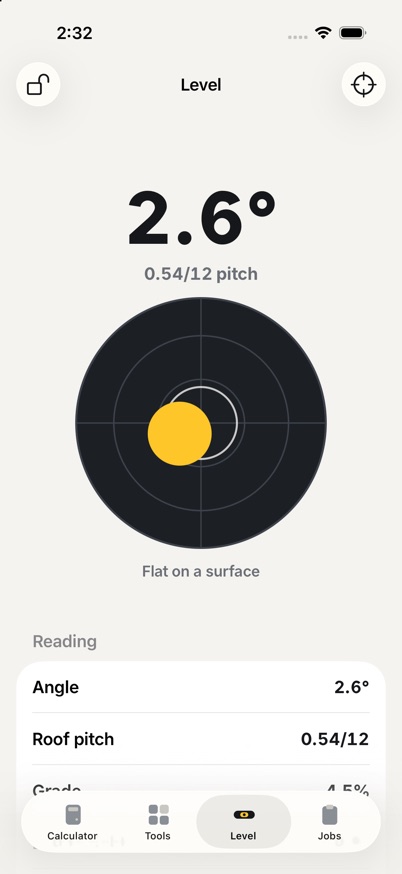
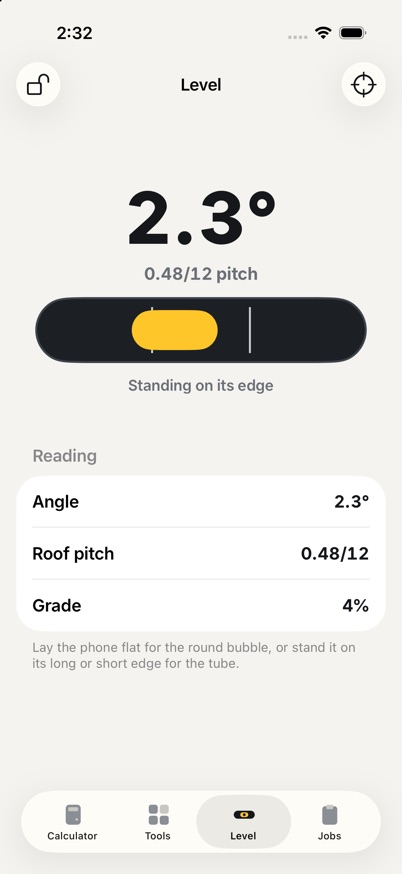
Stud's Level tab turns your iPhone into a bubble level: a round bubble when the phone lies flat, a tube bubble when it stands on an edge, in portrait or landscape. It shows the angle in degrees, the roof pitch in x/12 and the percent grade at the same time, turns green with a haptic tick when you are within 0.05° of level, and lets you lock the reading and set zero on any surface. It is free, with no account, and works offline.
How does the level work?
The level reads the phone's motion sensor, the same one that rotates the screen. Stud uses the direction of gravity to work out how far the phone is tilted:
- Flat on a surface: a round bubble shows the tilt in both directions, like a bull's-eye level on top of a post or a washing machine.
- On an edge: a tube bubble shows the tilt along the edge, like a torpedo level. Stand the phone on its long side for a shelf or a sill, or on its short side for a short run. Portrait and landscape both read 0 when level or plumb.
What does it show?
| Reading | Example at 26.57° |
|---|---|
| Angle | 26.57° |
| Roof pitch | 6/12 |
| Percent grade | 50% |
| Level indicator | Green with a haptic tick under 0.05° |
The three numbers are the same slope said three ways, so you can lay the phone on a rafter and read the pitch directly, or check that a walk or a drain falls 2% without converting. A 2° slope, for example, reads about 0.42/12 and 3.5%. The roof pitch chart lists pitch, degrees, grade and slope factor side by side.
What are lock and set zero for?
- Lock freezes the reading. Hold the phone against an overhead joist or inside a cabinet, lock, and read it in front of you.
- Set zero makes any surface the reference. Put the phone on a table that is not quite level, set zero, and Stud measures every other surface relative to it. Zero is kept separately for flat use and edge use, so calibrating one does not change the other.
A phone case with a camera bump or a raised edge can tilt the phone. Set zero on a surface you trust, or check against a known level, before relying on a reading.
Can I use it on this website?
Yes. The bubble level page on this site works in a phone browser that gives access to the motion sensor. To turn a measured rise and run into pitch without the sensor, use the roof pitch calculator.
How accurate is a phone level?
It depends on the phone's sensor and on what the phone is resting on. The green indicator appears under 0.05°, but a case, a curved back or a dirty surface can add more error than that. For finish work, check the phone against a good spirit level once and use set zero if they disagree. For framing and roof pitch, a phone reading is usually more than precise enough, and it gives you degrees and pitch in one look.
Frequently asked questions
Is there a free level app that shows roof pitch?
Yes. Stud's level shows the angle in degrees, the roof pitch in x/12 and the percent grade together, free, with no ads and no account.
Can I calibrate the level?
Yes. Set zero on any surface. Flat and edge readings each keep their own zero.
Which iPhone do I need?
Any iPhone with iOS 26 or later. The level uses the phone's motion sensor.
Does it need a connection?
No. The level reads the sensor on the device and works offline.