The best level apps in 2026 are Bubble Level for iPhone (the most rated, with extra tools behind a subscription), Pocket Bubble Level XXL (free with ads, $1.99 to remove them) and Bubble Level: Angle Finder AR (with an Apple Watch app). Stud, our construction calculator, has a free bubble level built in that reads roof pitch in x/12 and percent grade, which most level apps do not show. A phone level is fine for checks, not for setting a foundation.
Quick answer
- Most rated level app: Bubble Level for iPhone, 4.6 from 111,731 ratings, with angle, surface, inclinometer, AR ruler and a metal detector; Pro by subscription.
- Free and simple, with ads: Pocket Bubble Level XXL, 4.8 from 17,176 ratings; $1.99 removes ads.
- Apple Watch readout: Bubble Level: Angle Finder AR, angles to a tenth of a degree, live on the watch.
- Level plus pitch and grade, inside a calculator: Stud (our app). Free, no ads, no account. It is new.
What to look for in a level app
- Two modes: a round bubble with the phone flat, a tube bubble with the phone on its edge.
- Readouts you use: degrees for angles, x/12 for roofs, percent grade for drainage and ramps.
- Calibration or set zero: phone cases and camera bumps tilt the phone, so you need to zero it on a reference surface.
- Lock: freeze the reading when you cannot see the screen.
- Ads and subscriptions: a full-screen ad in the middle of a reading is the usual complaint with free tools.
How we picked
We kept iPhone apps that work as a bubble level, angle finder or inclinometer, with enough ratings or recent updates to be a fair choice. For each we read the US App Store listing on November 23, 2026: price, in-app purchases, readouts listed, last update and rating. We did not test their accuracy.
The six apps at a glance
| App | Developer | Price (App Store, Nov 23, 2026) | Readouts listed | Last update | Ratings shown |
|---|---|---|---|---|---|
| Stud (our app) | The Stud team | Free, no in-app purchase | Degrees, roof pitch x/12, percent grade | New | Stud is new |
| Bubble Level for iPhone | Lemondo Apps LLc | Free; in-app purchases $0.99 to $19.99, including subscriptions | Level, angle, surface, inclinometer, compass | Nov 17, 2026 | 4.6 (111,731) |
| Pocket Bubble Level XXL | ExaMobile S.A. | Free with ads, $1.99 premium | Angle or inclination; degrees and percent in premium | May 16, 2026 | 4.8 (17,176) |
| Bubble Level Plus+ | Tue Nguyen Minh | Free, $0.99 and $1.99 upgrades | Level, angle, slope | Nov 5, 2025 | 4.5 (15,421) |
| Bubble Level: Angle Finder AR | Jens Rieckhof | Free; in-app purchases $1.99 to $29.99 | Angle to 0.1°, slope %, AR protractor | Nov 4, 2026 | 4.5 (724) |
| Angle Finder: Level Tool | OneRack | Free; $7.99/week or $29.99 lifetime | Angle, surface flatness, ruler | Nov 16, 2026 | 4.7 (177) |
Stud (our app)
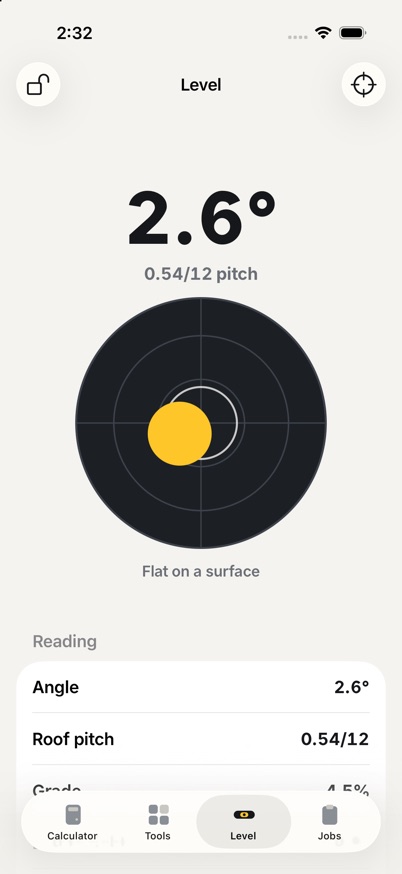
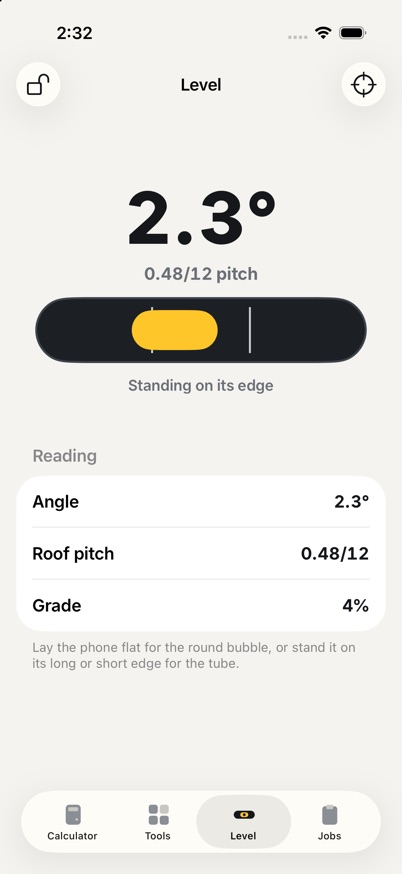
Stud's Level tab uses the phone's motion sensor. Lay the phone flat for a round bubble, or stand it on an edge (portrait or landscape) for a tube bubble. It shows the angle in degrees, the roof pitch in x/12 and the percent grade, turns green with a haptic tick under 0.05°, locks the reading, and lets you set zero on any surface, kept separately for flat and edge use. More on the bubble level page, or open the web bubble level.
- Choose it if: you want a level and a construction calculator in one free app, with no ads.
- Limits: it is new, with no App Store ratings yet, and needs iOS 26. No camera or AR modes, no Apple Watch app, no metal detector or compass.
Bubble Level for iPhone
The most rated level on the App Store: water level and object alignment, angle measurement, surface flatness, a metal detector to find wire in walls, an inclinometer for off-road driving, an AR ruler, room plans and a compass.
- Choose it if: you want many measuring tools in one app.
- Limits: Pro tools are a subscription. The listing describes $1.99 a month, $7.99 for three months or $24.99 a year with a 3-day trial, while the in-app purchase list shows a 1 Year option at $19.99; check the price inside the app.
Pocket Bubble Level XXL
A level that uses the accelerometer and gyroscope, shows angle or inclination in each plane, locks orientation and measures roof pitch or a table's slope. No internet needed.
- Choose it if: you want a free, highly rated basic level.
- Limits: ads in the free version; the $1.99 premium removes them and adds a camera clinometer and percent readings.
Bubble Level Plus+
A simple level from the maker of Feet & Inches Tape Calculator, with calibration for vertical and horizontal use.
- Choose it if: you want a plain, widely used level.
- Limits: the last update was November 2025; upgrades at $0.99 and $1.99.
Bubble Level: Angle Finder AR
Angles to a tenth of a degree, one-touch calibration, an AR ruler and protractor, and an Apple Watch app with live readings, lock and save.
- Choose it if: you want to read the angle on your wrist while holding a board.
- Limits: a long list of in-app purchases, from $1.99 to a $29.99 lifetime premium, including weekly plans.
Angle Finder: Level Tool
Angle and surface flatness readings, an on-screen ruler, metric and imperial units, fully offline.
- Choose it if: you want a recent, clean angle finder.
- Limits: Pro is $7.99 a week or $29.99 lifetime; fewer ratings (177).
Frequently asked questions
What is the best free level app?
Pocket Bubble Level XXL is free and rated 4.8 from 17,176 ratings, with ads. Stud's level is free with no ads and adds roof pitch and percent grade, but it is new.
Are phone level apps accurate?
They can read small angles, but accuracy depends on the phone's sensor and on calibration. Zero the app on a known level surface, keep the case flat, and use a real level for anything structural.
Can a level app measure roof pitch?
Yes. Stud shows roof pitch in x/12 directly; most other level apps show degrees, which you can convert with our roof pitch calculator.
What is the difference between an angle finder and an inclinometer?
Both measure tilt. An angle finder usually reads the angle between surfaces or from level, while an inclinometer reads slope from horizontal, often in degrees and percent.
Sources
- Bubble Level for iPhone on the App Store
- Pocket Bubble Level XXL on the App Store
- Bubble Level Plus+ on the App Store
- Bubble Level: Angle Finder AR on the App Store
- Angle Finder: Level Tool on the App Store